Showing posts with label Vbulletin. Show all posts
Quarto — vBulletin 5 Responsive Retina Ready Theme

Quarto — vBulletin 5 Responsive Retina Ready Theme

Quarto -- vBulletin 5 Responsive Retina Ready Theme

Quarto -- vBulletin 5 Responsive & Retina Ready Theme

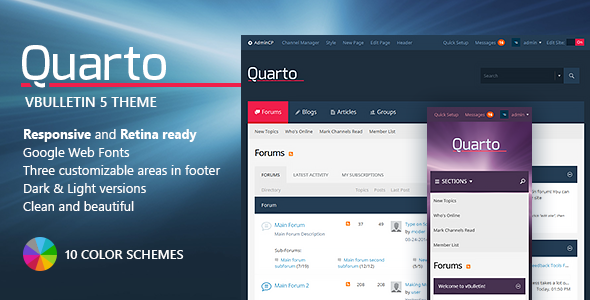
We are glad to release Quarto theme for vBulletin 5.1.10 and vBulletin 5.2.1. It’s a clean and simple style that fully supports the latest vBulletin community software. Quarto for vBulletin 5 is fully responsive and retina-ready. It will look great on any desktop, laptop, tablet or smartphone. Quarto theme will help you to build a popular community.


Quarto theme is 100% responsive. Your community members will be glad to visit your forum from any device – desktop, tablet or a smartphone


All the theme graphics are fully scalable, so the theme will always be 100% sharp on a high-resolution screen


Quarto for vBulletin 5 includes 10 ready-made color schemes. 5 in dark and 5 in light colors. So you can easily choose an appropriate color scheme for your community.


You won’t need to translate any buttons or any theme graphics. The theme supports any language pack from box.


The theme supports additional information blocks in the footer for your contacts, extra links or any other content.


Full and detailed documentation included. If you have any questions on using the theme – you’ll find the answer inside the documentation!


Buying the theme you get premium support!


Credits

Update List

Version 1.0.13 - 30/04/2016* Theme update for vBulletin 5.2.1Version 1.0.12 - 08/02/2016* Theme update for vBulletin 5.2.0Version 1.0.11 - 12/12/2015* Theme update for vBulletin 5.1.10Version 1.0.10 - 07/10/2015* Topic list fix* Status icons on topic list fix  Updated template -             css_additional.css  Added files -             quarto/COLOR_SCHEME/topic-posted-ltr.svg             quarto/COLOR_SCHEME/topic-posted-rtl.svgVersion 1.0.9 - 27/08/2015* Theme update for vBulletin 5.1.9* Fixed icons path issueVersion 1.0.8 - 30/07/2015* Theme update for vBulletin 5.1.8* Fixed login box issuesVersion 1.0.7 - 27/05/2015* Theme update for vBulletin 5.1.7Version 1.0.6 - 24/04/2015* Theme plugin update* Minor CSS fixes Version 1.0.5 - 05/04/2015* Theme update for vBulletin 5.1.6* Minor CSS fixes Version 1.0.4 - 15/02/2015* Minor CSS fixes - Quarto Asphalt Light XML updatedVersion 1.0.3 - 12/02/2015* Minor CSS fixes* Plugin code fixVersion 1.0.2 - 02/02/2015* Theme update for vBulletin 5.1.5Version 1.0.1 - 20/11/2014* Theme update for vBulletin 5.1.4Version 1.0.0 - 17/09/2014* Initial released
Paper - Flat Theme for vBulletin 5 Connect

Paper - Flat Theme for vBulletin 5 Connect

Paper - Flat Theme for vBulletin 5 Connect

Paper – Flat Theme for vBulletin 5 Connect

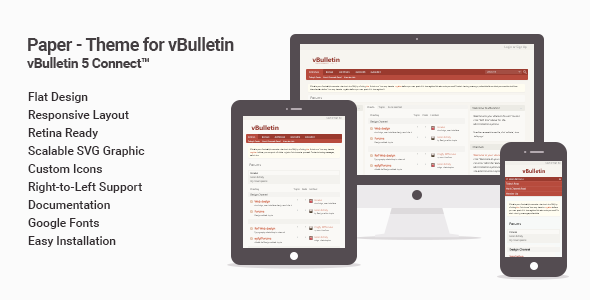
The Paper Theme is a flat style for vBulletin 5 Connect(tm) – the world’s leading community software.

Supported version: vBulletin 5.2.1

Retina Ready

Uses scalable icons in SVG format to support high-resolution screens.

Right-to-Left Support

The theme supports any vBulletin language pack, including RTL languages.

Adaptive Design

Responsive layout adapts to any device: desktop, tablet or phone.

Easily Customizable

All the fonts and colors of this theme can be easily customized in standard vBulletin “Style Variable Editor”, no coding is required.

Key Features

  • vBulletin 5 Connect(tm)
  • Flat Design
  • Responsive Layout
  • Retina Ready
  • Cross Browser Support
  • Right-to-Left Support
  • Google Fonts
  • Scalable SVG Graphic
  • Custom Icons
  • Documentation
  • Easy Installation
Paragon - A vBulletin 4 Suite Theme

Paragon - A vBulletin 4 Suite Theme

Paragon - A vBulletin 4 Suite Theme

Paragon

Please be sure to read the update section below when considering purchasing this theme.

Paragon is a premium theme for the full vBulletin 4.x suite: the CMS and blog in addition to the forum. It was designed to serve those vBulletin users who want a more modern hi-tech look for their vBulletin-based site. Though Paragon features full suite customization, the theme will work with forum-only installations.

Features

  • Full vBulletin Suite customization (CMS, blog, and forum.)
  • Five color schemes in fixed and fluid widths.
  • An easy to edit custom footer region (individual templates are installed for each footer column via included plugins.)
  • Three custom CMS grids (these are currently only compatible with the fixed versions of the theme).
  • CSS3 typeface for the various headings. Includes seven different fonts. See the preview images to view the different fonts.
  • Lavalamp style jquery animated navigation bar.
  • Xenforo-inspired jquery dropdown login in box.
  • Includes layered .PSD files used in the creation of the graphics.
  • Detailed documentation.

Below are live demos of each of the color variations included with this theme:

Updates

Below details what version of vBulletin the theme is compatible with as well as any additional updates. The theme will be updated promptly with each new stable vBulletin version that is released. The theme will not be updated for alpha and beta releases.

August 18, 2014
  • Added fluid versions of the theme.
  • Fixed mismatching text colors in the what’s-new blog sidebar and CMS navigation for the children themes.
June 29, 2014

Compatibility update for vBulletin version 4.2.2.

Metro Mobile - A Mobile Theme for vBulletin 4.2

Metro Mobile - A Mobile Theme for vBulletin 4.2

Metro Mobile - A Mobile Theme for vBulletin 4.2

Metro Mobile – A Mobile Theme for vBulletin 4.2.3 Forum, Blog and vB CMS

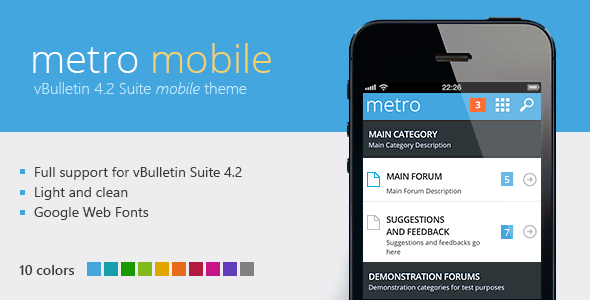
We are proud to announce Metro Mobile – a mobile vBulletin 4.2.3 style that fully supports forums, blogs and vB CMS. Metro Mobile theme is a clean, contrast and modern vBulletin style to display you forum on a mobile device.


Features

  • 10 color schemes;
  • Google web fonts;
  • Completely remade icons;
  • Layered PSD files included;
  • Cross browser support;
  • Easy installation;
  • Full documentation and support.

Color schemes

The theme has 10 color schemes – Blue, Teal, Green, Lime, Golden, Orange, Red, Violet Red, Purple and Black & White

QRCode to view the theme on your mobile device

Update List

Version 1.0.5 - 13/12/2015* Search button overlapping grid menu items fixed* Updated templates:   - vbulletin.cssVersion 1.0.4 - 26/07/2015* Theme updated to vBulletin 4.2.3* Updated templates:   - vbulletin.css   - headincludeVersion 1.0.3 - 24/12/2013* Facebook login fixedVersion 1.0.2 - 12/07/2013* Updated version number for 4.2.1 compatibilityVersion 1.0.1 - 03/04/2013* Embedded videos width fixedVersion 1.0.0 - 13/02/2013* initial released
Metro - A Theme for vBulletin 4.2 Suite

Metro - A Theme for vBulletin 4.2 Suite

Metro - A Theme for vBulletin 4.2 Suite

Metro -- A Theme for vBulletin 4.2.3 Forum, Blog and vB CMS

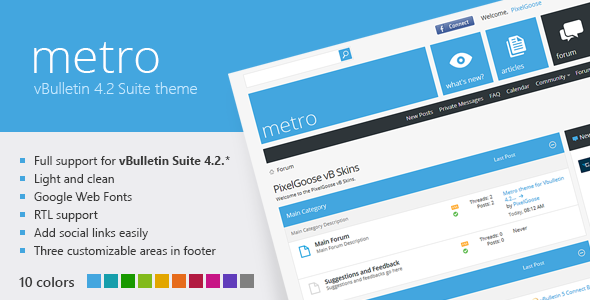
We are proud to announce Metro -- a vBulletin 4.2.3 style that fully supports forums, blogs and vB CMS. Metro theme is a clean, contrast and modern vBulletin style. Both fixed and fluid versions are available.


Features

  • 10 color schemes;
  • Fixed and fluid layout;
  • Google web fonts;
  • Completely remade icons;
  • 4 editable blocks in footer;
  • RTL forums support;
  • All the default banner regions are respected;
  • Layered PSD files included;
  • Cross browser support;
  • Easy installation;
  • Full documentation and support.
  • Includes both vBulletin 4.2.0 and 4.2.3 versions.

Color schemes

It has 10 color schemes – Blue, Teal, Green, Lime, Golden, Orange, Red, Violet Red, Purple and Black & White
(press any scheme icon for live preview)

The theme has four custom footer blocks that can be easily edited through a special page in the admin control panel.

Now you can easily add links to your forum profiles in social networks without editing templates. Just add them on the Metro Management page

Custom forum icons

All the forum icons are remade from scratch to match the theme.

Support

If you have any questions or need help, feel free to contact us! We will be glad to help you.

Update List

29/07/2015* vBulletin 4.2.3 compatibility added24/10/2013* vBulletin 4.2.2 compatibility addedVersion 1.1.1 - 04/06/2013* Some RTL-forum bug fixes. Updated both the theme and the pluginVersion 1.1.0 - 07/05/2013* vBulletin 4.2.1 supportVersion 1.0.6 - 23/01/2013* Avatar padding in blog sidebar fixedVersion 1.0.5 - 20/01/2013* Minor css fixesVersion 1.0.4 - 18/01/2013* Advanced search link added* Announcements block style fixed* Minor css fixesVersion 1.0.3 - 09/01/2013* Fixed - the popup login box is now working with vBSEOVersion 1.0.2 - 12/12/2012* Fixed a few bugs in RTL-modeVersion 1.0.1 - 06/12/2012* Fixed css template for prefooter blocksVersion 1.0.0 - 03/12/2012* initial released
Primus - A Theme for vBulletin 4.2 Suite

Primus - A Theme for vBulletin 4.2 Suite

Primus - A Theme for vBulletin 4.2 Suite

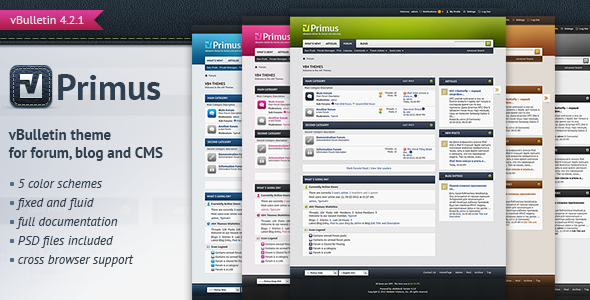
Primus – A Theme for vBulletin 4.2.3 Forum, Blog and vB CMS

Primus is a vBulletin 4.2.3 theme that fully supports forums, blogs and vB CMS. It has colorful and attractive modern view with some skeuomorphic elements. The theme can be easily customized for you purposes.

Features

  • Five color schemes;
  • Fixed and fluid layout;
  • Google web fonts;
  • Layered PSD files included;
  • Cross browser support;
  • Easy installation;
  • Full documentation and support.

Live demos of the color schemes:

Join us

Pixel Goose Twitter

Update List

Version 2.0.2 - 05/09/2015* Prefooter blocks css fixVersion 2.0.1 - 28/07/2015Theme updated to vBulletin 4.2.3Version 2.0.0 - 28/09/2014* Prefooter blocks plugin added* RTL fixes* Documentation update  Affected templates:  - additional.css  - vbulletin.css  - headinclude  - footerVersion 1.0.0 - 10/01/2012* Initial released
Electron - vBulletin Forum Skin

Electron - vBulletin Forum Skin

Electron - vBulletin Forum Skin

Theme for vBulletin 4.2.3 Forum, Blogs and CMS

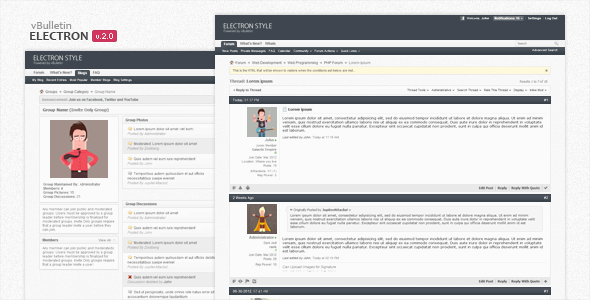
Electron is a vBulletin 4.2.x Forum style, designed in a clean and minimalistic style, for all those who love the modern looking web design. Supports vBulletin 4.2.x Publishing Suite – Forum, Blogs and CMS.

Features

  • Fluid and Fixed width style
  • Clean and minimalistic design
  • Supports right to left forums
  • Forum, Blogs and CMS
  • Cross browser support
  • XHTML and CSS3 valid code
  • Detailed documentation
  • Easy and quick installation
  • Supports vBulletin 4.2.1, 4.2.2, 4.2.3

Screenshots

  1. Forumhome
  2. Forumdisplay
  3. Forumdisplay as admin
  4. Showthread postbit legacy
  5. Showthread with poll
  6. Socialgroups group
  7. Socialgroups overview
  8. Memberinfo
  9. Memberlist
  10. Whosonline
  11. UserCP attachments
  12. UserCP settings
  13. UserCP modifybuddylist
  14. Socialgroups subscriptions
  15. Search results
  16. Recent blogs posts
  17. Forumdisplay (fixed layout)
  18. CMS home (fixed layout)
  19. CMS page (fixed layout)

Credits

Ideal - A vBulletin 4 Suite Theme

Ideal - A vBulletin 4 Suite Theme

Ideal - A vBulletin 4 Suite Theme

Ideal

Please be sure to read the update section below when considering purchasing this theme, as well as the FAQ under the Support tab.

Ideal is a premium theme for the full vBulletin 4.x suite: the CMS and blog in addition to the forum. It was designed to serve those vBulletin users who want a more clean, modern look for their vBulletin-based site. Though Ideal features full suite customization, the theme will work with forum-only installations.

Ideal looks great out of the box, but it also makes for an excellent base theme to build upon should you wish to customize it further.

Features

  • Full vBulletin Suite customization (CMS, blog, and forum.)
  • Ten color schemes in both light and dark variations and fixed and fluid widths.
  • An easy to edit custom footer region (individual templates are installed for each footer column via included plugins.)
  • Three custom CMS grids (currently only works with theme at fixed width only.)
  • CSS3 typeface for the various headings. Includes seven different fonts. See the preview images to view the different fonts.
  • All ad placement locations are honored.
  • Valid XHMTL.
  • Includes layered .PSD files used in the creation of the graphics.
  • Detailed documentation.

Live Demos (light)

Live Demos (dark)

Updates

Below details what version of vBulletin the theme is compatible with as well as any additional updates. The theme will be updated promptly with each new stable vBulletin version that is released. The theme will not be updated for alpha and beta releases.

Auguest 18, 2014
  • Added fluid versions of the theme as seperate installations. The included custom grids are only compatible with the fixed versions at this time.
June 26, 2014
  • Updated the installation XMLs so buyers will no longer have to click “Ignore Style Version” when installing the theme.
  • Updated author contact information in the documentation.
June 1, 2013
  • Added five new dark color schemes.
May 28, 2013
  • Fixed an issue with the birthday listings on the forumhome page.
May 27, 2013

Version update. Compatible with vBulletin version 4.2.1.

  • When closing the login box, it will now remain on the current page instead of redirecting to the frontpage.
  • Added new status icon images which were introduced with vBulletin 4.2.1.
  • Fixed the navbar menu customization which was bugged in 4.2.1 due to changed CSS declarations.
  • Fixed bugged sidebar headers on the group pages.
July 6, 2012

Version update. Compatible with vBulletin version 4.2.0.

  • CSS3 font-family typeface has been added to the various heading regions around the theme. Seven free-to-use fonts have been included. See documentation for further details
  • Three custom CMS grids are now included with the theme. Two grids have ten widget locations, one with left sidebars, the other with right sidebars. The third has one column with three widget areas, to be used for a landing page or the like.
  • Added a jquery popup login box.
  • A variety of small visual tweaks have been done around the theme to give it an even more appealing look.
  • The fluid width install XML files have been removed. This was done for the sake of the custom grids. However, the theme retains its fluid-width compatibility. Making the theme fluid width is easy to do; see the included documentation for instructions. Please note that the included custom grids will not function with the theme at a fluid width.
March 6, 2012

Version update. Compatible with vBulletin version 4.1.11.

  • The text has been changed to bold in various head sections and the navbar tabs.
  • Changed the background hover color for the user info links and drop-down box in the header for improved contrast.
  • Reworked the featured blog entries listings section to be more distinct and visually appealing.
January 23, 2012

Maintenance release. Compatible with vBulletin version 4.1.10.

  • Fixed an issue which appeared in the last release that resulted in missing .js file errors.
  • Fixed an issue with the display of the footer region for those running vBulletin with the branding-free option.
January 16, 2012

Version update. Compatible with vBulletin version 4.1.10.

  • Fixed an issue where the user information element in the header wasn’t showing for some logged-in members using browsers with ad blocking.
January 2, 2012

Version update. Compatible with vBulletin version 4.1.9.

  • Stand-alone installation XMLs are now included for each style variation to make installation easier for those who wish to use only one of the styles. See updated documentation for details.
November 19, 2011

Version update. Compatible with vBulletin version 4.1.8.

October 12, 2011

Version update. Compatible with vBulletin version 4.1.7.

  • Added a stylized page title region. See included documentation for details.
  • Added a slanted vertical line background to the body region.
  • Changed the background color for the toolbar and memberinfo popup menus for improved legibility.
  • Enlarged the tab collapse/expand images for the forum sidebar.
  • Fixed an issue with the Facebook like button not appearing at the top of threads.
  • Increased the font size and line spacing in threads.
October 1, 2011

Version update. Compatible with vBulletin version 4.1.6.

September 25, 2011

Initial release. Compatible with vBulletin version 4.1.5.